
Animation Maker Manual
Getting Started
How to
Brushes
- Fire Brush
- Stream Brush
- Water Brush
- Wave Brush
- Radial Wave Brush
- Bend Brush
- Blinking Light Brush
- Drift Brush
- Zoom Brush
- Rotation Brush
- Background Copy Brush
- Glitter Brushes
Static Animations
Welcome to Animated Screensaver Maker
Download and Install
To get started with Animated Screensaver Maker you don't need to register or to buy it. Just download the free trial version from our site and evaluate all its features.
1. Click the download link and save the installation file to your computer.
2. Locate the file on your computer, double click it, and follow the steps in the installation process. Animated Screensaver Maker will automatically add a shortcut to your desktop for easy access.
Navigating the Main Screen
When launching Animated Screensaver Maker for the first time, you can open an example project to try out all the great features and really get a feel for how things work, without having to learn in detail how to use its tools.
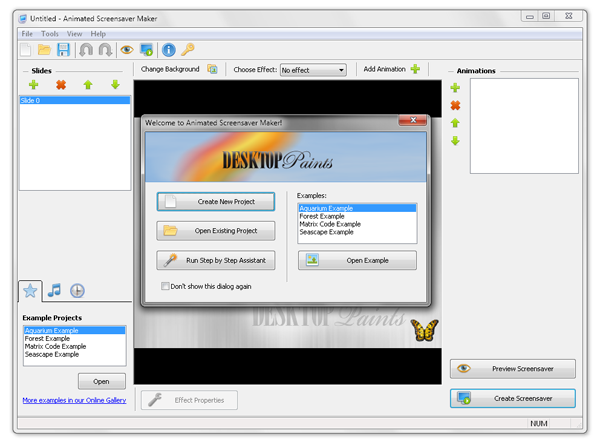
Here are some things you may want to try:
- 1. Open another example from the left bottom list
- 2. Browse the wide selection of available animations by clicking the "Add Animation" button
- 3. Create a screensaver from one of the example projects
Creating a Screensaver
To turn your project into a new screensaver, click the "Create screensaver" button in the right bottom corner of the main screen. You should see the following dialog:
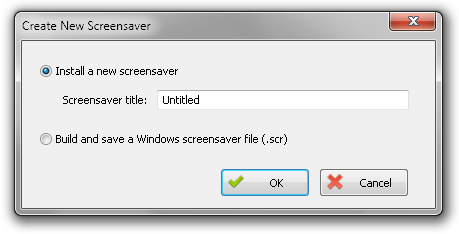
There are two options:
1. "Install a new screensaver" - A new screensaver will be installed on your computer so you can use it as your default screensaver immediately. To uninstall screensavers created by this option, use the "Uninstall Screensavers..." option in the Animated Screensaver Maker main window (menu -> tools -> Uninstall Screensavers...).
2. "Build and save a windows screensaver file (.scr)" - Use this option if you want to save a screensaver file in a particular folder on your computer. Then you can share your screensavers with others or use them whenever you want.